Anybody going to IT Nation this week? Come by and see me at the LogicNow booth this week.

Anybody going to IT Nation this week? Come by and see me at the LogicNow booth this week.
It has been a while since MAX released the feature to be able to have options pop up when clearing checks. Therefore I thought I would briefly cover them in a blog post given some recent interest on LinkedIn.
See the YouTube short version here: https://www.youtube.com/watch?v=U9Z2ZJs7A40
The check clearing options allow you to set 24×7 Check clearing and Daily Safety Check (DSC) clearing separately. It also allows you to have the check clearing be interactive, allowing for on-the-fly selection of check clearing behavior.
To access the Check Clearing Settings select the Settings menu and choose General Settings. Then choose Check Clearing from the options on the left.
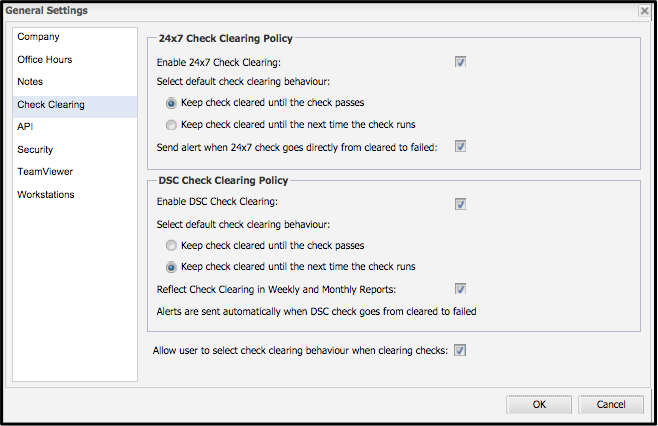
From the Check Clearing settings you can set the check clearing policies for either 24×7 or DSC to the following options
Keep check cleared until the check passes – means the check will remain cleared until after it is no longer failing AND it fails again.
Keep check cleared until the next time the check runs – means the check will reset the very next time it runs and either pass or fail based on the new results of the check.
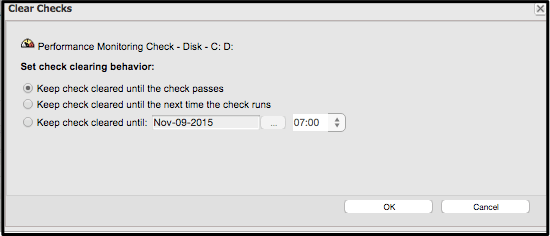
The really interesting option though is the “Allow user to select check clearing behavior when clearing checks.” This option allows the user to select how the check is going to stay cleared using the two rules above OR another option that allows you to Keep check cleared until … a certain date and time.
* NOTE: At this time there is a known bug with clearing the check until a specific date and time that sets the date for 30-Nov-1999
An additional option, not shown in the Check Clearing settings is the ability to add notes when clearing a check. If you add the option to add notes when clearing a check, the notes fields are mandatory. You must fill out at least one of the notes fields (public or private) to clear the check.
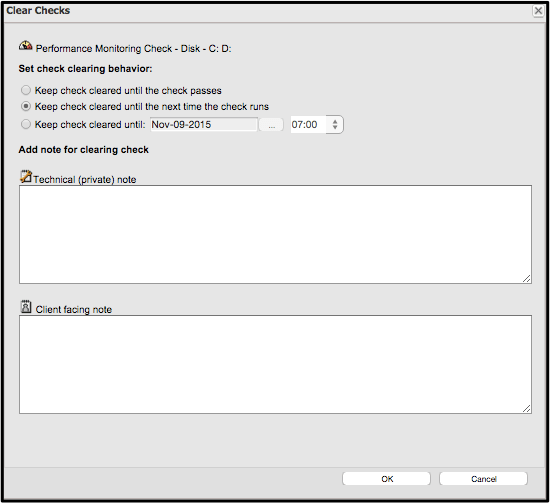
The notes feature is really useful in larger MSPs with multiple technicians so that a reason must be given whenever a check is cleared. This helps more than just knowing who cleared the check but requires them to give a reason for clearing it as well.
 It’s all about the data. With the revelation of LogicCards yesterday, LogicNow ushers in a new era of using the power of data and people to predict issues and prescribe solutions in the managed services realm. This use of deep but anonymous data combined with the experience of thousands of IT experts creates a value to the MSP that cannot be matched by any competitor in the space.
For larger MSPs, LogicCards will act as another pair of eyes watching the dashboard and making sure that anomalies are being addressed and best practices are being followed. In a large dashboard with hundreds of devices, this could be a significant amount of time saved, and LogicCards doesn’t ask for time off. Smaller MSPs gain from the knowledge and experience of the community, helping them to grow their businesses with intelligence. Furthermore, all MSPs using LogicCards are now able to leverage the power of big data and analytics in their business regardless of size.
On a related note, I had in interesting conversation last night about the future of the industry and I put into words something that I had thought about but not yet articulated. Data is emerging as the most valuable resource on the planet. Many MSPs already know this intrinsically but what does it mean to their business models? Devices are becoming disposable, cloud infrastructure is becoming commoditized, the future value proposition then is making sure clients can reach their data consistently, in a form that they can consume and ensuring that it is safe from theft or corruption. What do you think?
Hats off to day one…getting ready for day 2. #MAXCC

I saw this plant growing out of a stone wall almost 20 feet in the air on a recent trip. It reminded me that even in the most difficult circumstances your business can not only survive but thrive. Here are some of my ideas on how to help your business thrive in the worst of times.
1. Always be taking care of your customers. Your customers are the source of revenue, the very lifeblood of your company. Without revenue you can pack up and go home. During the good times it is too easy to take customers for granted. Make sure you are maintaining them as raving fans all the time and they won’t leave you when times get tough.
2. Budget. You must have a solid grasp of the money going out as the money coming in. As a rule of thumb you should have 1.5 times your regular expenses in revenue during good times. This will allow you to save up. My recommendation is to have 3 months revenue in savings to cover unexpected downturns. For example, this would give you 6 months of operating cash if your revenue suddenly dropped in half without cutting any expenses.
3. Treat your employees as well as your customers. Good employees who are treated well will stick with you in the tough times.
4. Never stop selling. As a business owner it is easy to get caught up in the minutae of running a business especially when things get rough. One of the most important things I learned in business was that cutting costs will never replace new revenue in the long term. Cutting expenses always takes away something, a feature, a perk; whatever it is it probably had value. Also cutting has a limit you can only cut to zero. Revenue on the other hand has no limits.
Remember that we never plan to fail but many of us at one time or another have failed to plan.
 It used to be that only companies needed to worry about brand. I think that statement is not entirely true. I think that in the past only companies could afford to build their brand. With all of the tools available to us today like social media, blogs and other free ways to “mass-merchandise” anything, we have the tools to create our own personal brands at little or no cost.
But what does it mean to build your own brand? In the old days of family crests, the elements of the crest meant different things, different colors had different meanings and often one could tell the profession of the family by their crest. These days our “crests” are our LinkedIn, Facebook and other social media profiles. Our resume’, interests, hobbies and skills are all there for everyone to see. Those things don’t tell the entire picture. Blog posts are an excellent way for people to see what really inspires you. Videos create a multi-sensory interaction that let people get to know you in a way written words rarely can. Your online presence is your brand. The more ways you give people to interact with you, the broader you make your brand. The more content you post, the deeper your brand gets.
So why does this matter? In my opinion, two ways.
First, and most obvious, building a personal brand helps us in our professional lives by giving substance to a flat resume’ or cover letter. The more an potential employer can be “involved” with your online presence, the more likely your are to make a connection or generate interest. In our personal lives it also makes it easy for others with similar interests to find us, opening the doors for friendships that may never have happened otherwise.
Second, and this one is more humbling, if we do not care for our brand it can have negative results. Too many posts of late night parties tells it’s own story to a potential employer or even spouse. I am not saying you should not post fun things. What I am saying is that you should make sure that your online presence accurately portrays you, the whole you, as you want to be known by the world. Sometimes this means filling in the gaps by making an extra effort to share non-fun things that you are interested in.
Lastly, building your personal brand should be fun, if you are working to hard at it, it probably isn’t a true picture of you. In the end, just make sure you never post anything you wouldn’t want your mother to see, because she probably will.
Everyone starts a blog with greatest of intentions. Shortly after the beginning of the year, as LogicNow began its journey as a separate entity, I was promoted to sales engineer supervisor. My time became restricted taking on new responsibilities. I believe I have now gotten back to a place were I can start blogging again.
Starting this week there will be new blog articles. I also plan on doing some non-MSPS articles that I hope you find interesting as well.

OK, I admit it after 40 something years on the planet I cannot remember everything anymore. I also wish Mr. Allen had come out with GTD sooner. Everyone’s brain works differently so what works for me may not work for you but I thought I would waste just a little virtual paper here to share what has worked for me.
Getting Things Done methodology. Getting Things Done has changed my personal productivity life to the same magnitude that The E-Myth changed my entrepreneurial life. The two main things that I subscribe to are getting everything out of my head and recorded elsewhere; and putting it someplace where it will be available when I need it or remind me at the appropriate time. To accomplish this, I have three main tools…
– Moleskine notebooks – I currently have three divided up this way…
– Work General – large Moleskine, hard cover
– Work Demo Journal – ex-large Moleskine, softcover
– Personal – Evernote edition Moleskine Cahier
– Outlook – any email client will work
– Physical inboxes – one at home and one at work to collect all the things I need to process.
Evernote is the one ring that rules them all. Anything that I need to capture permanently goes into Evernote. With the scannable app on my iPhone it makes getting receipts, pages from my notebooks and random pieces of information into Evernote quickly and easily. Evernote serves as the center point of my system now primarily due to the fact that I can flow all of my digital and physical items into it and it provides the most versatile searching capability of all of them. The other advantage to Evernote is that it is available anywhere, on any device, or the web.
Outlook is my email client for work so I use it for all of my calendar, reminders and tasks at work. For personal email I use the standard email app on my Mac. If I need to create reminders from items in my personal email I forward them over to Evernote and create a reminder there.

As we look back into last year and make our resolutions for the next, I have a comment to make. For Christmas I received a Jawbone UP24 from my lovely wife. After using it for the last several days I have made a revelation of sorts. This is not something I didn’t know but what I did not realize is how powerful it can be.
If we care about something enough to measure it, we will more likely succeed at it. Setting goals is great because if you don’t know where you want to go you will never get there. Making progress towards that goal however takes measurement of incremental successes and failures. This is exactly what my Jawbone and its companion app on my iPhone allow me to do for my health. At work, I use ZOHO reports and Excel spreadsheets to do the same thing. In each case I am seeing daily results towards my larger goal and I can make instant, micro adjustments every day to modify my outcome.
There are some keys to success with this process:
1. Data must be collectable, easily collectable. The more automated the better.
2. Review of the data must happen regularly, daily, weekly, whatever; without fail.
3. You must take action on the data or it doesn’t matter.
Think about how you are going to measure your path to your New Years resolutions so that you can enjoy the minor successes along the way.
My latest blog post at MAX IQ
http://www.maxfocus.com/max-iq/answering-call-making-sure-customers-heard/

